Table of Contents
- Understanding Local and Remote IT Support
- Remote IT Support for Small Businesses: Benefits and Limitations
- IT Support Response Times: What Matters Most
- Service Level Agreements: Protecting Your Business
- Hybrid IT Support Services: The Best of Both Worlds
- Key Factors to Consider When Choosing IT Support
- Making Your Decision
- Frequently Asked Questions
Last Updated: October 8, 2026
Understanding Local and Remote IT Support
Choosing between local vs remote IT support is one of the most important decisions a business can make. The right choice affects your downtime, your security, and how quickly you can get back to work when things go wrong.
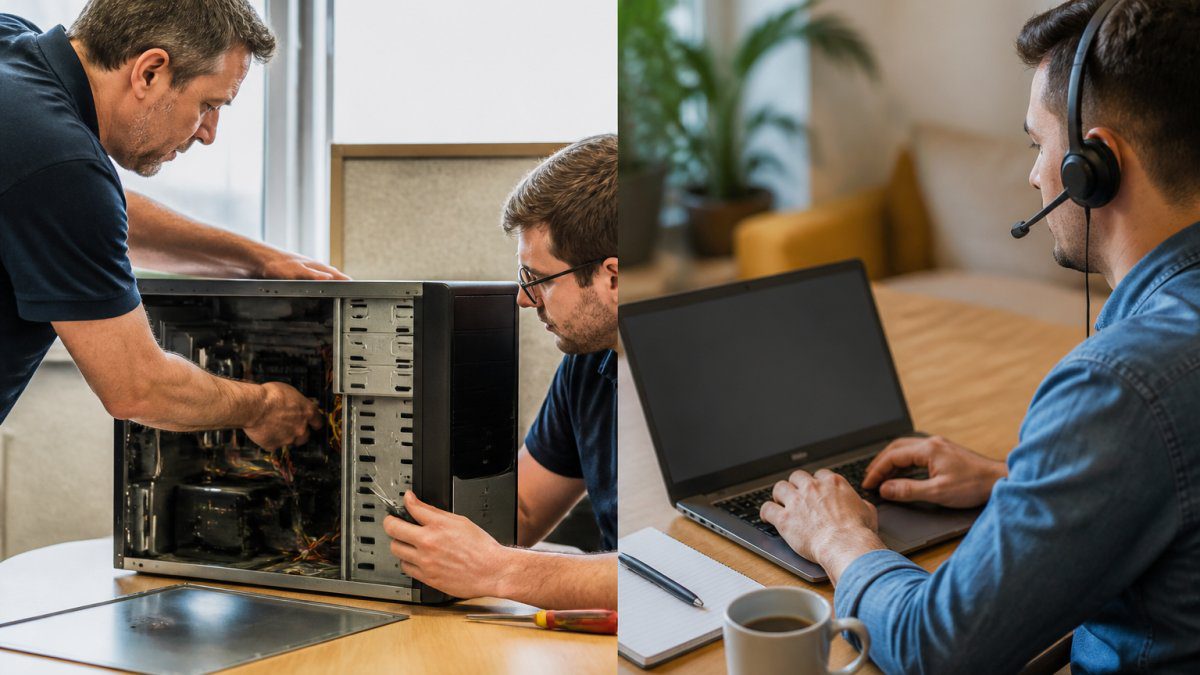
Local IT support means having technicians who can visit your site in person. They understand your specific environment, your equipment, and your team. Remote IT support means support teams access your systems over the internet from their own location. Both approaches have genuine strengths, and the best choice depends on your business size, complexity, and tolerance for risk.
At Ibertech Solutions, we’ve worked with businesses across Norfolk and Suffolk, and we’ve seen how the wrong choice creates real problems. A manufacturing firm with critical machinery needs different support than an e-commerce business. A startup with five employees has different needs than a firm with fifty. The decision isn’t about which option is universally better, it’s about which one fits your actual situation.

Remote IT Support for Small Businesses: Benefits and Limitations
Remote IT support for small businesses offers genuine advantages, particularly for cost and speed. A technician can connect to your systems within minutes and diagnose problems without travelling. For software issues, password resets, and network troubleshooting, remote access solves most problems faster than waiting for someone to arrive on-site.
The cost is lower. You pay for the time spent on your issue, not for travel time. This matters when your team is small and your budget is tight. Remote support also gives you access to specialists you might not find locally. If you need expertise in a specific system or application, a remote team can pull in the right person regardless of geography.
But remote IT support has real limitations. A technician cannot physically inspect your hardware, replace a failed drive, or troubleshoot network cabling. If your internet connection fails, remote support becomes impossible, which is precisely when you need help most. Remote teams also have less context about your physical setup, your security practices, and how your team actually works. They see your systems; they don’t see your people or your environment.
For small businesses in Norfolk and Suffolk with straightforward IT needs, remote support can work well. For businesses with complex hardware, physical security concerns, or critical systems that cannot afford downtime, remote support alone creates risk.
IT Support Response Times: What Matters Most
Response time is the interval between reporting a problem and having someone start working on it. This matters more than most businesses realise.
A one-hour response time sounds fast until your systems are down and you’re losing revenue every minute. A four-hour response time is acceptable for non-critical issues but catastrophic for production systems. The right response time depends on what happens when your systems fail.
Local IT support typically offers faster response times because travel distance is short. A technician in Diss can reach most businesses in the area within 30-60 minutes. This matters when you have hardware failures, network outages, or security incidents that require immediate physical intervention.
Remote IT support can offer instant connection for software and network issues. A technician logs in and starts working immediately. But for hardware problems, the response time advantage disappears. You still need someone on-site, and that person may be hours away.
The key factor is whether your critical issues are software-based or hardware-based. If your business depends on servers, networking equipment, or specialised hardware, local support with strong response times becomes essential. If your critical systems are cloud-based or can be accessed remotely, response times matter less because remote technicians can often resolve issues without visiting your site.
The best response time is one that matches your actual downtime cost. If losing your systems for an hour costs more than your annual IT support budget, you need response times measured in minutes, not hours.
Service Level Agreements: Protecting Your Business
A Service Level Agreement (SLA) is a contract that guarantees specific levels of service. It defines response times, resolution times, and what happens if the provider fails to meet those commitments.
An SLA protects you by creating accountability. Instead of hoping your IT support team responds quickly, you have a written guarantee. If they miss the target, there are consequences, usually a credit to your account or a reduction in your bill.
Local IT support providers can typically offer stronger SLAs for response time because they control travel distance. They can commit to reaching you within one hour because they know their service area. Remote support providers can offer strong SLAs for connection time, they can commit to connecting within 15 minutes, but they cannot guarantee resolution time for hardware problems.
When evaluating an IT support provider, ask specifically about their SLA. What is their response time guarantee? What counts as “resolved”? What happens if they miss their target? A provider who hesitates to commit to specific numbers is signalling that they cannot reliably meet them.
For businesses in Norfolk and Suffolk, look for providers who understand your local environment and can commit to response times that match your needs. A vague promise of “fast support” is not protection. A written SLA with specific numbers and consequences is.
Hybrid IT Support Services: The Best of Both Worlds
Hybrid IT support combines local and remote resources. Your IT team handles routine issues and monitoring remotely, reducing costs. When physical intervention is needed, a local technician visits your site.
This approach captures the advantages of both models. You get the cost efficiency and speed of remote support for most issues. You get the physical presence and local expertise of on-site support when you actually need it.
Hybrid support works particularly well for growing businesses. As your systems become more complex, you need both remote monitoring and local expertise. A hybrid provider can scale with you, adding resources as your needs change.
The trade-off is complexity. You need a provider who can seamlessly blend remote and local resources. Poor coordination between remote and on-site teams creates delays and frustration. The best hybrid providers have integrated systems, shared documentation, and clear communication protocols.
Businesses in Norfolk and Suffolk often find hybrid support ideal because they get local presence without paying for it constantly. You pay for remote monitoring as your baseline, then add on-site visits only when necessary.
Key Factors to Consider When Choosing IT Support
Several factors should guide your decision. Start with your actual needs, not your assumptions about what you might need.
System criticality: How much revenue do you lose per hour of downtime? If the answer is significant, you need support with fast response times and the ability to resolve hardware issues. Local support becomes more valuable.
System complexity: Do you have specialised equipment, custom software, or complex networking? Local support with deep knowledge of your specific setup is valuable. If your systems are standard and cloud-based, remote support works well.
Team size and IT expertise: Small teams with no IT staff need more hands-on support. Larger teams with IT specialists can handle more issues internally and use support for specialised problems.
Budget constraints: Remote support is less expensive. Local support costs more but prevents expensive downtime. The right choice is the one where the cost of support is less than the cost of downtime.
Security requirements: Some businesses have compliance requirements that mandate on-site support for certain tasks. Review your compliance obligations before deciding.
Geographic location: Businesses in rural areas may have limited local support options. Hybrid support becomes more attractive when local expertise is scarce.
Before committing to any IT support provider, ask for references from businesses similar to yours. Ask specifically about response times during actual incidents, not just marketing promises. Real experience from similar businesses is your best guide.
Making Your Decision
The choice between local vs remote IT support is not about which option is objectively better. It is about which option reduces your risk and cost for your specific situation.
Start by defining what “good support” means for your business. What response time do you need? What issues require on-site presence? What is your budget? Once you have clear answers, you can evaluate providers against those criteria.
Consider hybrid support as a genuine option, not a compromise. Many businesses find that combining remote monitoring with occasional on-site visits gives them the best balance of cost and reliability.
When you evaluate providers, look for those who understand your business type and your local context. A provider familiar with manufacturing firms in Norfolk is more valuable than a generic national provider. A provider who has worked with e-commerce businesses understands the specific risks you face.
Getting the right IT support is fundamental to keeping your business running. Downtime costs money, security breaches damage trust, and systems that aren’t properly maintained create problems that compound over time. At Ibertech Solutions, we provide both remote monitoring and on-site support tailored to your specific needs. Our local team in Diss understands the challenges businesses in Norfolk and Suffolk face, and we offer flexible support options that scale with your growth. We focus on preventing problems rather than just fixing them after they happen. If you’d like to discuss which support approach works best for your business, we’re here to help. Get in touch today to find out how we can keep your systems secure, up-to-date, and running smoothly.
Frequently Asked Questions
What is the difference between local and remote IT support?
Local IT support involves technicians visiting your office to diagnose and fix problems in person, whilst remote IT support handles issues through internet connections and monitoring tools. Local support suits hardware failures and complex on-site installations; remote support works well for software issues, account management, and routine maintenance. Many businesses find that combining both, hybrid IT support services, gives them flexibility and faster resolution for different problem types.
Is remote IT support suitable for small businesses?
Yes. Remote IT support for small businesses offers cost-effectiveness and 24/7 availability without requiring permanent on-site staff. It works particularly well for cloud-based systems, email, Microsoft 365 management, and cybersecurity monitoring. However, if your business relies on physical servers, complex networking, or frequent hardware maintenance, you may need occasional on-site visits. A hybrid approach often gives small businesses the best value.
How important are IT support response times?
Response time directly affects your downtime costs. If your systems fail, every minute without email or internet can mean lost sales or productivity. IT support response times vary widely: some providers guarantee response within 15 minutes, others within 4 hours. Check what response time your provider commits to in their service level agreement, especially for critical systems. Faster response times typically cost more but may save you money if downtime is expensive for your business.
Can a business use both local and remote IT support?
Absolutely. Hybrid IT support services combine remote monitoring and troubleshooting with on-site visits when needed. This approach lets you benefit from 24/7 remote monitoring to catch problems early, whilst having local technicians available for hardware repairs, network setup, and complex installations. Many growing businesses start with remote support and add local visits as they expand or when their infrastructure becomes more complex.