
Table of Contents
- Step 1: Define Your Project Goals and Conversion Objectives
- Step 2: Research Your Target Audience and Build User Personas
- Step 3: Conduct a Comprehensive SEO Audit and Content Inventory
- Step 4: Plan Your Information Architecture and Sitemap
- Step 5: Develop Your Website Redesign Strategy and Content Plan
- Step 6: Design, Build, and Test for Mobile-First and Accessibility
- Step 7: Execute Your Launch with 301 Redirects and Monitoring
- Step 8: Post-Launch Maintenance and Iterative Growth
Last Updated: August 2, 2026
Step 1: Define Your Project Goals and Conversion Objectives
The foundation of any successful website redesign lies in clarity about what you’re trying to achieve. Without defined goals, you’re redesigning without a measurable target. Teams starting with vague objectives like "make it look better" consistently underperform compared to those with specific, measurable conversion targets.
Begin by auditing your current website performance using Google Analytics 4. What pages drive the most traffic? Where do visitors drop off? Which pages generate leads or sales? This baseline lets you measure success post-launch.
Establish your primary conversion goal: newsletter signups, contact form submissions, product purchases, or demo requests. Secondary goals matter too, reducing bounce rate on key pages, increasing time on site, or improving mobile engagement. The clearer your targets, the easier it becomes to make design decisions that move the needle.
Document your goals in a shared spreadsheet with target metrics. For example: “Increase contact form submissions from 12 to 25 per month” or “Reduce homepage bounce rate from 58% to 45%”. Specific numbers create accountability and make success measurable after launch.
Step 2: Research Your Target Audience and Build User Personas
Most redesigns fail because they prioritise aesthetics over user needs. Understanding who visits your site, what problems they’re solving, and how they behave online is essential before any design work begins.
Start by segmenting your audience using Google Analytics 4. Are you targeting small business owners, enterprise decision-makers, or end consumers? Do they visit primarily on mobile or desktop? This breakdown reveals geography, device type, operating system, and which pages each segment visits most.
Create 2-3 detailed user personas based on real data. A persona might be: "Sarah, 35, operations manager at a 20-person manufacturing firm in Norfolk, researches solutions on her phone during lunch breaks, prefers clear pricing and case studies from similar-sized businesses." Specific personas ensure your design serves actual visitors.
Conduct basic user research if budget allows. Survey existing customers, conduct brief interviews, or use Hotjar to watch session recordings and identify friction points. You’ll spot patterns, perhaps visitors can’t find your pricing page or the contact form is too long. These insights drive better redesign decisions than any design trend.
Your website redesign should solve real problems for real people. User personas grounded in data ensure your new site serves visitors, not just internal preferences.
Step 3: Conduct a Comprehensive SEO Audit and Content Inventory
A proper SEO audit at the start prevents catastrophic traffic loss post-launch. Many redesigns treat SEO as an afterthought, only to discover they’ve designed themselves into a corner.
Use tools like Ahrefs or SEMrush to audit your current site. Document which pages rank in Google, their current positions, and their traffic. Check for technical issues: broken links, slow page speed, missing meta descriptions, crawl errors. This inventory becomes your migration blueprint. Every page that ranks needs a 301 redirect to its new equivalent, or you’ll lose rankings overnight.
Audit your existing content. Which pages perform best? Which ones rarely get traffic? This tells you what to keep, what to improve, and what to retire. Document your information architecture and URL structure. If your current site has /services/web-design and it ranks well, your new site should maintain that URL.
Google’s SEO starter guide emphasises maintaining URL structure during migrations. Following this guidance prevents the common scenario where a beautifully redesigned site loses 30-40% of organic traffic in the first month.
| Audit Element | What to Check | Why It Matters |
|---|---|---|
| Ranking keywords | Which pages rank and for what | Informs which content to preserve |
| Page speed | Current Core Web Vitals scores | Mobile performance affects rankings |
| Backlinks | Which pages have external links | Redirects must preserve link equity |
| URL structure | Current page paths and hierarchy | Changes require 301 redirects |
| Technical issues | Crawl errors, broken links | Must be fixed before launch |
Step 4: Plan Your Information Architecture and Sitemap
Information architecture is how your site’s pages relate to each other. Poor architecture confuses visitors and tanks SEO. Good architecture makes finding information intuitive, which search engines reward.
Map your current sitemap, then redesign it based on user research and analytics. If 60% of visitors land on your services page first, that page should be prominent in navigation. If your pricing page gets lost three clicks deep, move it up.
Create a new sitemap using tools like Miro or a simple spreadsheet. The goal is clarity: a visitor should understand where they are and how to get where they need to be within two clicks. Consolidate where possible, if you have eight service pages saying similar things, combine them. Fewer, more focused pages perform better than many thin pages.
Test your proposed architecture with actual users. Show them the sitemap and ask: "Where would you click to find X?" If they guess wrong, revise the structure. This costs nothing but saves months of regret after launch.
Step 5: Develop Your Website Redesign Strategy and Content Plan
A website redesign strategy connects your goals, audience research, and technical audit into a coherent plan. Without this, design decisions become reactive and inconsistent.
Document your strategy across these dimensions: brand positioning, unique value proposition, tone of voice, page flow, customer journey, and content supporting each stage. Create a content migration plan mapping which existing content moves as-is, which needs rewriting, and which pages are new. Include old and new URLs, this becomes your redirect mapping document, essential for preserving SEO.
Establish your design system and brand guidelines before any design work begins. Consistent colours, typography, button styles, and spacing build trust and professionalism. If your redesign uses five different button styles, it feels disjointed.
Plan your development approach. WordPress offers flexibility and cost-efficiency. Shopify excels for e-commerce. Page builders prioritise speed-to-launch. For bespoke requirements in Norfolk and Suffolk, many businesses benefit from working with a specialist agency that understands their specific needs and provides ongoing support post-launch.
Decide on your tech stack after defining your needs, not before. If you choose a page builder because it’s cheap, then later need custom integrations, you’re stuck.
Step 6: Design, Build, and Test for Mobile-First and Accessibility
This is where strategy becomes reality. Your design and build phase determines whether the redesigned website actually works for users or just looks good in mockups.
Wireframing and UI/UX Design
Start with wireframes, not finished designs. Wireframes are low-fidelity sketches showing page structure, content hierarchy, and user flow without visual design. They force you to think about layout and usability before investing in graphics.
Use your user personas to guide design decisions. If Sarah uses her phone during lunch breaks, your mobile experience must work flawlessly at small screen sizes. If your audience skews older, use larger fonts and higher contrast. Design for conversion, every page should have a clear call-to-action. Make it obvious where visitors should click next.
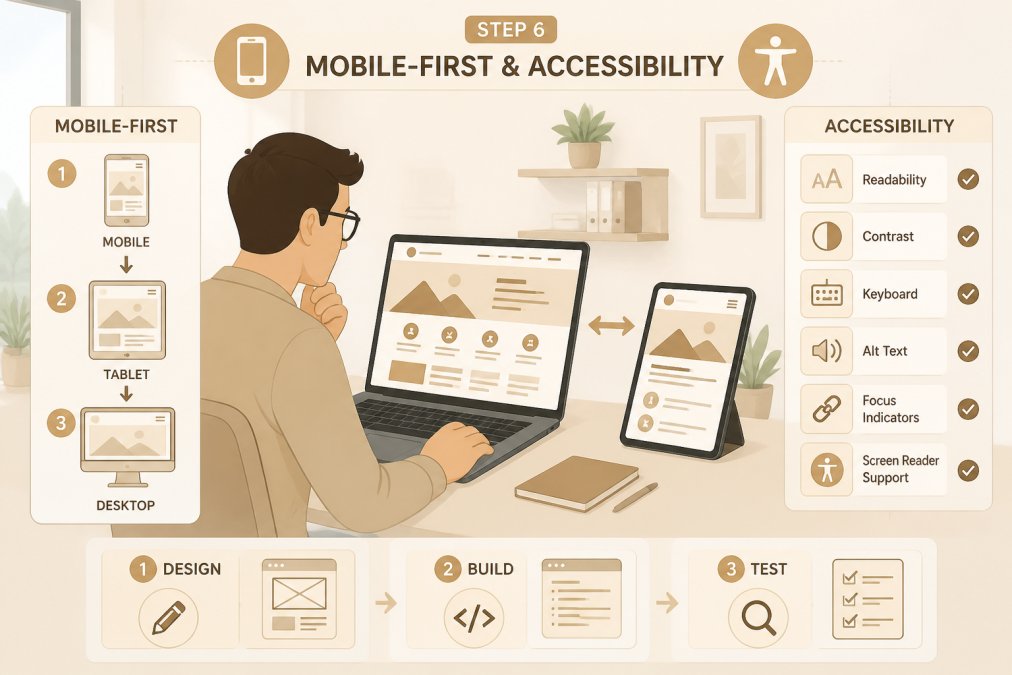
Accessibility is a legal requirement under the Equality Act 2010 and a practical necessity. Ensure your design meets WCAG 2.1 AA standards: sufficient colour contrast, keyboard navigation support, alt text for images, and proper heading hierarchy. Accessible design benefits everyone, people with disabilities, older users, and people in noisy environments all appreciate accessible sites.
Quality Assurance and Cross-Browser Testing
Before launch, test relentlessly. Cross-browser testing ensures your site works in Chrome, Firefox, Safari, and Edge. Test on real devices, a desktop browser might render perfectly, but mobile Safari might break. Tools like Virtuoso QA automate much of this testing.
Test functionality: do forms submit? Do payment systems process? Do links work? Do videos play? Create a comprehensive testing checklist covering every interactive element.
Page speed affects both user experience and SEO rankings. Aim for Core Web Vitals scores in the "good" range: largest contentful paint under 2.5 seconds, cumulative layout shift under 0.1, first input delay under 100ms. Google’s Core Web Vitals guide explains these metrics and why they matter.
Test on slow connections. Simulate 4G and 3G speeds to see how your site performs for users on mobile networks. Usability testing with real users catches issues you’d miss alone. Watch five people use your new site for the first time and note where they get stuck.
Step 7: Execute Your Launch with 301 Redirects and Monitoring
Launch day is high-stakes. A botched migration can tank your traffic and rankings. Proper planning and execution prevent this.
Your 301 redirect mapping is critical. Every old URL must redirect to its new equivalent. A 301 redirect tells search engines: "This page moved permanently to this new address." Most ranking power transfers, though some is lost in the process.
Set up monitoring before you flip the switch. Configure Google Analytics 4 and Google Search Console on your new site. Set up uptime monitoring to catch outages instantly. Configure alerts for traffic drops, errors, or slow performance.
Launch in stages if possible. Start with a small percentage of traffic hitting the new site while most still use the old one. Monitor for issues. Gradually increase traffic to the new site over 24-48 hours.
After launch, monitor obsessively for the first week. Check Google Search Console for crawl errors. Monitor your ranking positions, expect some fluctuation as Google re-indexes your site. Track traffic and conversion metrics. Are visitors finding what they need? Are conversions happening as expected?
Step 8: Post-Launch Maintenance and Iterative Growth
The redesign isn’t finished at launch, it’s just beginning. The most successful websites improve continuously based on real user data.
Set up regular monitoring. Track your key metrics weekly. Are you hitting your conversion goals? Is traffic stable? Are there pages with high bounce rates or low engagement? These signal opportunities for improvement.
Implement feedback loops using tools like Hotjar to watch how users interact with your new site. Where do they hesitate? Where do they get stuck? Use this data to refine your design and content.
A/B test strategically. Test one variable at a time, a different headline, CTA colour, or form field. Run tests for at least two weeks to gather statistical significance. VWO’s A/B testing best practices provides a framework for running rigorous experiments.
Update content regularly. Fresh content signals quality to search engines and gives visitors a reason to return. Add a blog, case studies, or resource centre. Monitor your technical health: check page speed monthly, monitor for broken links, keep your CMS and plugins updated. Plan for growth by scheduling quarterly reviews to assess what’s working and what needs improvement.
A successful website redesign requires strategy before design, user research before assumptions, and testing before launch. Teams that follow this process, defining goals, researching their audience, auditing current performance, planning architecture, designing with users in mind, testing thoroughly, and monitoring post-launch, consistently see better results.
If you’re in Norfolk or Suffolk and managing a redesign feels overwhelming, Ibertech Solutions specialises in bespoke website development that combines strategic planning with technical excellence. We handle the full process, from initial audit through post-launch optimisation, and provide ongoing support to ensure your site continues performing. Our local team understands the challenges facing East Anglian businesses and delivers custom solutions tailored to your specific goals. Call us today to discuss how a properly planned redesign can transform your digital presence and drive real business results.
Frequently Asked Questions
How long does a typical website redesign take?
Most website redesigns take 8-16 weeks depending on complexity, scope, and the size of your content inventory. Small business sites with straightforward requirements may launch in 6-8 weeks, whilst larger eCommerce platforms or those requiring custom development typically need 12-20 weeks. The timeline includes planning, design, development, testing, and post-launch support. Rushing this process risks poor quality assurance and SEO migration errors that damage your search rankings.
What should be included in a website redesign project plan?
Your project plan must cover: defined goals and success metrics; target audience research and user personas; a complete SEO audit and content inventory; information architecture and sitemap; wireframes and design specifications; development and CMS migration approach; a 301 redirect mapping strategy; quality assurance and testing protocols; analytics tracking setup; and post-launch monitoring schedules. Include timelines, resource allocation, stakeholder responsibilities, and a communication schedule. This ensures all teams stay aligned and nothing is missed.
How does a website redesign impact SEO and search rankings?
A poorly executed redesign can cause significant traffic loss if URLs change without proper 301 redirects, if content is deleted without redirect planning, or if technical SEO elements are overlooked. However, a well-planned redesign improves SEO by fixing technical debt, implementing responsive design, improving page speed, and enhancing user experience signals. Conduct an SEO audit before redesign, map all old URLs to new ones, preserve your domain authority, and test extensively. Monitor your search rankings and traffic closely for the first 4-6 weeks post-launch.
What are common pitfalls to avoid during a website redesign?
Avoid these mistakes: launching without proper 301 redirects (causes 404 errors and lost SEO value); deleting old content without redirect planning; poor mobile responsiveness; ignoring WCAG accessibility standards; inadequate quality assurance testing; failing to set up analytics tracking before launch; not conducting usability testing with real users; overlooking cross-browser compatibility; launching without stakeholder buy-in; and neglecting post-launch monitoring. Each of these can damage user experience, conversions, and search performance. Build these checks into your project plan from the start.